
• Updated on 7 May, 2026 by Ankita Banerjee
What's new?
COMEDK UGET Latest news and articles
COMEDK UGET Admit Card 2026 has been released on April 30, 2026, and candidates can download their admit card till May 9, 2026. Candidates must log in using their application number and password to download it from comedk.org. The admit card for COMEDK Exam 2026 contains key information like the candidate’s name, roll number, registration number, exam date and time, exam centre, and instructions for exam day. Students must carefully check all details for accuracy and in case of any discrepancy, students must reach out the authorities for rectification. On the exam day, candidates need to carry the admit card along with a valid photo ID, a passport-sized photograph, and any required self-declaration form. COMEDK UGET 2026 Exam Date is May 9, 2026.
- COMEDK UGET Admit Card 2026: Direct Link
- COMEDK UGET Admit Card 2026: Highlights
- How to Download COMEDK UGET Admit Card 2026?
- COMEDK UGET Admit Card 2026: Exam Day Instructions
- Details Mentioned on the COMEDK UGET Admit Card 2026
- COMEDK UGET Admit Card 2026: Review Guide
- Documents to Carry with the COMEDK UGET Admit Card 2026
- COMEDK UGET Admit Card 2026: Downloading Issue
- How to Recover COMEDK UGET Forgotten ID/ Password?
- COMEDK UGET Admit Card 2026 FAQs
COMEDK UGET Admit Card 2026: Direct Link
The Test Admission Ticet (TAT) for COMEDK UGET 2026 is available for download till May 9, 2026. Students can find the direct link to download the admit card as given below:
Direct Link to Download COMEDK UGET 2026 Admit Card
COMEDK UGET Admit Card 2026: Highlights
COMEDK UGET Hall Ticket 2026 has been released on April 30, 2026. Registered students can download it using their login credentials created during the COMEDK UGET 2026 Application Process. Here’s a quick summary of the admit cards of COMEDK UGET for students’ reference:
How to Download COMEDK UGET Admit Card 2026?
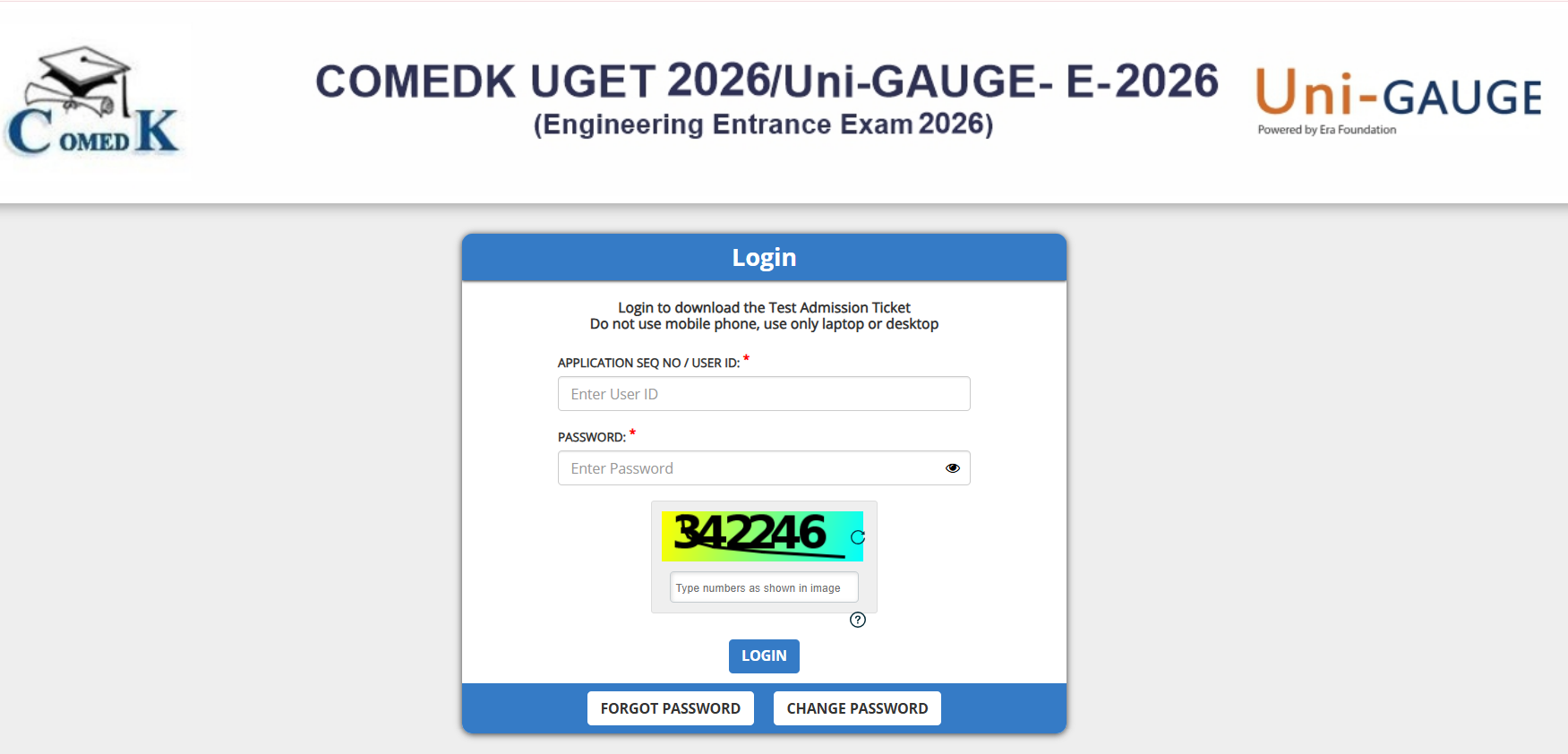
The COMEDK UGET Test Admission Ticket can be downloaded through the official COMEDK website using the login details. The admit card contains important information and must be checked carefully and carried to the exam centre. Below are the steps to follow to download the admit card:
- Open comedk.org and look for the COMEDK UGET Admit Card Download Link.
- Use the registration details (application number and password) provided during the application process to access the admit card.
- Once logged in, click the COMEDK UGET Admit Card Download Link. It will be displayed on the screen.
- Check all the information provided on the admit card carefully. If everything is accurate, proceed to download and print it.
- In case of difficulties in downloading the admit card, check if the login credentials are correct. If the website is down or facing technical issues, try downloading the admit card later. If the problem persists, contact the COMEDK helpdesk for assistance.
COMEDK UGET Admit Card 2026: Exam Day Instructions
The COMEDK UGET 2026 is an important exam for students seeking admission to undergraduate engineering and architecture courses in Karnataka. To ensure smooth exam day proceedings, candidates must carefully follow the instructions outlined on their admit card. These instructions help maintain order at the exam centres and ensure the safety and integrity of the exam process. On the exam day, candidates must adhere to the following guidelines, which will also be mentioned on the COMEDK UGET admit card:
- Reporting Time: Arrive at the exam centre well before the reporting time to avoid unnecessary stress. The reporting time will be provided on the admit card.
- What to Bring: Besides the admit card and ID proof, candidates may need to bring two recent passportsize photograph, a unique original photo ID.
- Prohibited Items: Certain items are strictly prohibited in the exam hall, and they are mobile phones, calculators, electronic devices, books or notes, and any cheating material.
- Dress Code: Candidates should avoid wearing loose or baggy clothes with large pockets or any accessories that may cause inconvenience. Candidates are advised to wear simple and comfortable clothing.
- Disciplinary Measures: Candidates found violating exam rules will be disqualified and could face legal consequences.
Details Mentioned on the COMEDK UGET Admit Card 2026
The COMEDK UGET Admit Card 2026 includes key details such as candidate name, roll number, exam date and time, exam centre, and instructions. Candidates must carefully verify all information in advance to avoid issues on exam day and ensure smooth entry to the examination hall.
Check the COMEDK UGET 2026 Exam Pattern to understand the marking scheme, question distribution, exam duration, and overall structure of the examination.
COMEDK UGET Admit Card 2026: Review Guide
This section highlights common errors candidates must check on the COMEDK UGET Admit Card 2026, such as name spelling, exam centre, date of birth, and photo clarity. Verifying these details early helps avoid exam-day problems and ensures timely correction through the COMEDK helpdesk if needed.
- Spelling Mistakes: Check that the name is correctly spelled, as even minor errors can confuse you.
- Incorrect Exam Centre: Ensure the exam centre mentioned on the admit card is accurate. If there is a discrepancy, immediately contact the exam authorities.
- Wrong Date of Birth: Confirm that the date of birth is correct. Any error in this detail should be rectified by contacting the helpdesk.
- Blurred Photograph or Signature: The photograph and signature should be visible. If they appear unclear, inform the authorities for correction. In case of discrepancies, the COMEDK helpdesk should be contacted for corrections.
Documents to Carry with the COMEDK UGET Admit Card 2026
Candidates appearing for COMEDK UGET 2026 must carry the admit card along with a valid photo ID, such as Aadhaar or passport, to the exam centre. Carrying a passport-size photograph and any required self-declaration form, if mentioned, helps ensure smooth identity verification on exam day.
- Valid Photo ID Proof: A government-issued photo ID is required for identity verification. Some of the accepted ID proofs include Aadhar Card, Passport, Voter ID, Driving License, Pan Card, and College ID (if applicable).
- Passport-Sized Photograph: In some cases, candidates may need to carry a recent passport-sized photograph for verification. It is advisable to carry an extra photo just in case.
- Self-Declaration Form: For certain protocols (such as COVID-related guidelines), a self-declaration form might be required. Candidates should check the admit card for any such instructions.
Also Read: COMEDK UGET Question Papers
COMEDK UGET Admit Card 2026: Downloading Issue
If the COMEDK UGET Admit Card 2026 cannot be downloaded, first check your login credentials. If the website is down, try later. Still unresolved? Contact the COMEDK helpdesk via phone (080 46671060) or email for assistance.
- Check Credentials: Ensure that the application number and password are entered correctly.
- Website Maintenance: If the website is down or undergoing maintenance, try downloading the admit card at a later time.
- Contact Helpdesk: If the admit card still cannot be downloaded, contact the COMEDK helpdesk for support. The contact details are: Phone: 080 46671060, Email: studenthelpdesk@comedk.org. The helpdesk will assist in resolving any issues.
Read More: COMEDK UGET Cutoff 2026
How to Recover COMEDK UGET Forgotten ID/ Password?
If a candidate forgets their COMEDK UGET 2026 ID or password, they can recover it by visiting the official website, selecting "Forgot ID/Password," entering their registered email or mobile number, and following the instructions to reset the password or retrieve the ID.
- Visit the Login Page: Go to the official COMEDK UGET website.
- Select "Forgot ID/Password": There will be an option on the login page for password or ID recovery.
- Provide Necessary Details: Enter the required information, such as the registered email ID or mobile number, to initiate the recovery process.
- Follow Recovery Instructions: After receiving the recovery link or OTP (one-time password), reset the password or retrieve the application ID.
- After successfully recovering the login credentials, candidates can proceed to download the admit card.
Know More About COMEDK UGET Results 2026
COMEDK UGET Admit Card 2026 FAQs
When is the COMEDK UGET Admit Card Test Admission Ticket 2026 released?
The COMEDK UGET Test Admission Ticket 2026 is released on April 30, 2026. Candidates can download it from the official website by logging in using their application number and password. It is advised to download the admit card well in advance to avoid last-minute technical issues or delays.
How can candidates download the COMEDK UGET Admit Card 2026?
Candidates can download the admit card by visiting the official COMEDK website and accessing the login portal. After entering the required credentials, such as application number and password, the admit card appears on the screen. Candidates must download and print multiple copies for future reference and exam day use.
What details are mentioned on the COMEDK UGET Test Admission Ticket 2026?
The COMEDK Test Admission Ticket 2026 contains important details, including the candidate’s name, application number, photograph, exam date, time, and exam centre address. It also includes exam day instructions and guidelines. Candidates must carefully verify all the details and report discrepancies immediately to the authorities if found.
Is it mandatory to carry the COMEDK UGET Admit Card 2026 to the exam centre?
Yes, carrying the admit card to the exam centre is mandatory for all candidates. Without a valid printed admit card, candidates are not allowed to enter the examination hall. It serves as an essential identity document and confirms the candidate’s eligibility to appear for the exam.
What should candidates do if there is an error in the COMEDK UGET 2026 Test Admission Ticket?
If candidates find any incorrect information on the admit card, they must immediately contact the COMEDK authorities for correction. It is important to resolve discrepancies before the exam date to avoid issues during verification at the examination centre.
Can candidates change their exam centre after the admit card is released?
No, candidates are generally not allowed to change their exam centre once the admit card is released. The allotted exam centre is final, and candidates must appear at the same location mentioned in the admit card on the scheduled exam date.
What documents should candidates carry along with the COMEDK UGET 2026 Test Admission Ticket?
Along with the COMEDK UGET 2026 Test Admission Ticket, candidates must carry a valid photo ID proof such as an Aadhaar card, PAN card, passport, or driving license. The identity proof must match the details mentioned on the admit card to ensure smooth verification at the exam centre.
What should candidates do if they forget their login credentials?
If candidates forget their login credentials, they can use the “Forgot Password” or “Forgot Application Number” option available on the official website. By following the instructions and verifying their registered email or mobile number, candidates can retrieve or reset their credentials easily.
Is a digital copy of the admit card accepted at the exam centre?
No, a digital copy of the admit card is not accepted at the exam centre. Candidates must carry a printed hard copy of the admit card. It is recommended to print the admit card clearly so that all details and the photograph are visible for verification purposes.
What are the important instructions mentioned on the COMEDK UGET Admit Card 2026?
The admit card includes essential exam day instructions such as reporting time, prohibited items, dress code (if any), and conduct guidelines. Candidates must read these instructions carefully and follow them strictly to avoid disqualification or inconvenience during the examination process.
Exam Calendar
Explore exam calendars tailored to your interest