
• Updated on 26 Oct, 2026 by Nishad Anjum
What's new?
NDA Latest news and articles
To begin the NDA Application Process, candidates have to visit the official UPSC website. Then create a One Time Registration account by entering basic personal details. After registering, log in to your account dashboard and select the active NDA examination cycle to start filling out the form.
Next, choose your defense branch preferences and select your preferred exam city location. Upload clear scanned copies of your photo, signature, and identity proof document. Finally, pay the hundred rupee application fee online and submit your completed application form to finish the registration process.
- What is the NDA Application Process Overview?
- What Documents Are Required for NDA Application 2026?
- What is UPSC One Time Registration (OTR)?
- How to Fill the NDA Online Application Form Step by Step?
- What is the NDA Application Fee and Payment Method?
- What Are the Key Rules and Guidelines for NDA Registration?
- NDA Application Process FAQs
What is the NDA Application Process Overview?
The UPSC conducts the NDA exam twice every year (NDA 1 and NDA 2). Candidates must register through the official portal (upsconline.nic.in) using the One Time Registration (OTR) system before submitting their examination form.
What Documents Are Required for NDA Application 2026?
Candidates must keep their documents and scanned files ready before filling out the online application form.
- Photo Identity Proof: Government photo ID card (Aadhaar, Voter ID, PAN, Passport, Driving License) in single PDF format (20 KB to 300 KB).
- Scanned Photograph: Recent passport-size photograph in JPG/JPEG format (20 KB to 300 KB) with a clear background.
- Scanned Signature: Signature in black ink on white paper in JPG/JPEG format (20 KB to 300 KB).
- Class 10 Certificate: Used for verifying your full name and date of birth.
- Class 12 Certificate / Admit Card: Used for checking educational qualification details.
- Payment Details: Net banking, Debit/Credit Card, or UPI details for fee payment.
What is UPSC One Time Registration (OTR)?
Every candidate must create a One Time Registration (OTR) profile on the UPSC portal before filling out any application form. OTR saves your basic personal information so you do not need to enter it again for future UPSC exams.
Steps to Complete UPSC OTR:
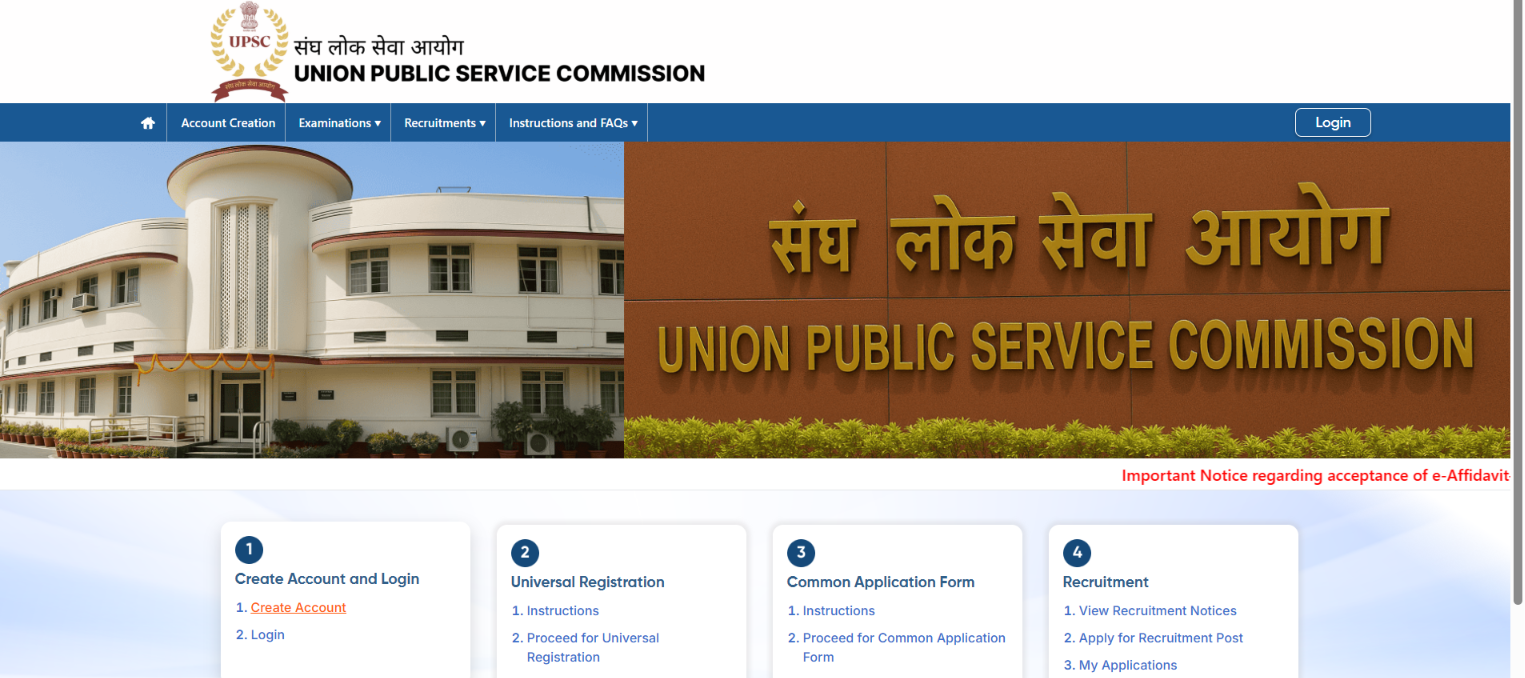
- Visit Portal: Open upsconline.nic.in and click on Create Account.
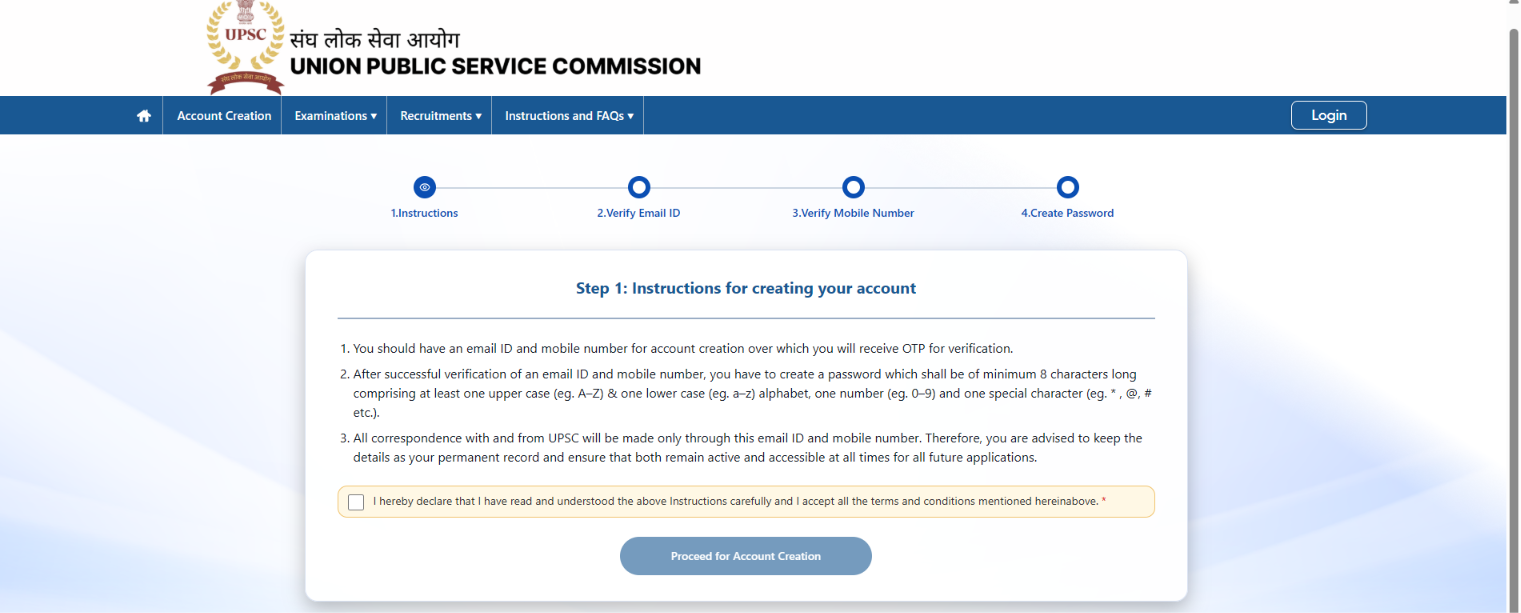
- Continue by clicking on ‘Proceed for Account creation’
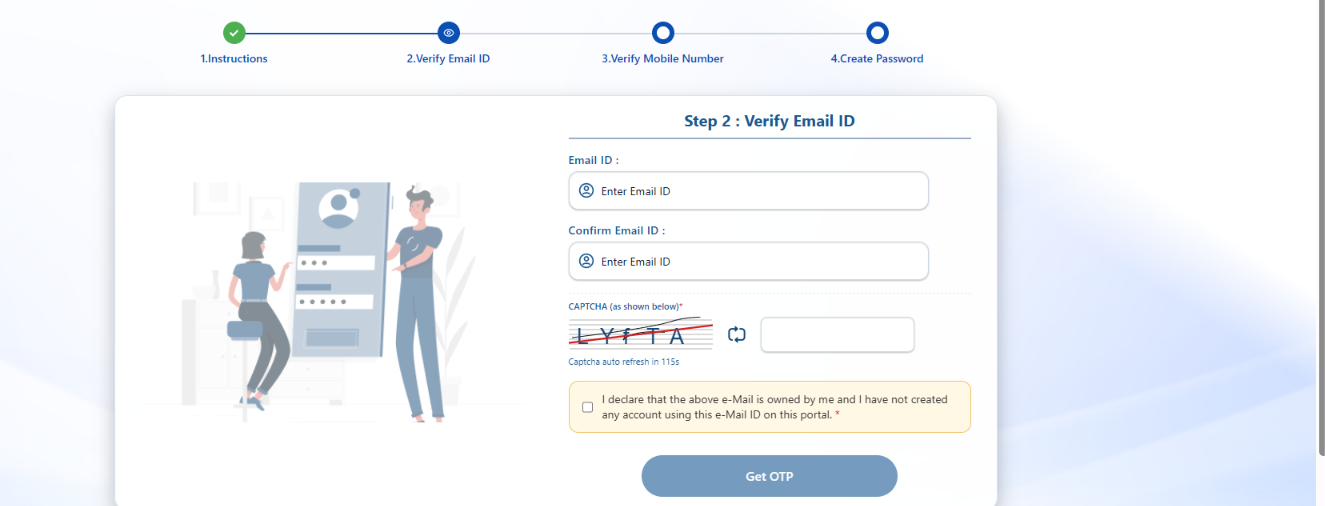
- Verify your Email Address
- Verify your mobile number
- Set Password: Log in and create a permanent password for your OTR account.
How to Fill the NDA Online Application Form Step by Step?
After completing OTR, candidates must complete Part I and Part II of the NDA application form.
Step 1: Log In to Dashboard
Log in to upsconline.nic.in using your registered email ID, mobile number, or OTR ID along with your password.
Step 2: Fill Part I Application
- Select the active examination link for NDA & NA Examination.
- Check your auto-filled personal details from OTR.
- Select your educational qualification status (Class 12 passed or appearing).
- Choose your service preferences among Army, Navy, Air Force, and Naval Academy (rank them from 1 to 4).
- Review all details carefully and click on Submit to generate your Registration ID.
Step 3: Fill Part II Application & Pay Fee
- Pay the application fee of INR 100 online (if applicable).
- Select your preferred exam center city from the available list.
Step 4: Upload Photo, Signature, and ID Proof
- Upload your scanned passport-size photograph and scanned signature.
- Upload your photo ID proof PDF.
- Capture a live photograph using your webcam or phone camera as required by the portal.
Step 5: Final Submission
- Preview the entire application form to check for errors.
- Read the declaration statement and click on I Agree.
- Download, save, and print a copy of your completed application confirmation page.
What is the NDA Application Fee and Payment Method?
The fee structure depends on the candidate's category. Candidates can pay fees online or via cash at an SBI bank branch using a challan.
What Are the Key Rules and Guidelines for NDA Registration?
- First-Apply-First-Allot Exam Centers: Exam centers freeze automatically once their capacity fills up. Apply early to get your nearest city.
- Match Board Details: Your name, date of birth, and parents' names must match your Class 10 certificate exactly.
- Correction Window: UPSC opens a correction window for a few days after the application deadline to fix minor details.
- No Hard Copy Needed: You do not need to send physical paper forms to the UPSC office by post.
NDA Application Process FAQs
What is the official website to apply for the NDA exam?
Candidates must apply online through the official UPSC registration portal at upsconline.nic.in.
Is One Time Registration (OTR) mandatory for NDA application?
Yes, every candidate must complete OTR on the UPSC portal before filling out the NDA application form.
What is the application fee for female candidates in NDA?
Female candidates from all categories are completely exempted from paying the application fee.
Can Class 12 appearing students apply for the NDA exam?
Yes, students currently studying in Class 12 or appearing for their board exams can apply for the test.
Can I change my exam center after submitting the NDA application form?
No, exam centers are allotted on a first-apply-first-allot basis and cannot be changed after final submission.
What should I do if my photo or signature upload fails?
Make sure your scanned files meet the official file size rules (20 KB to 300 KB) and format (JPG/JPEG for photo and signature, PDF for ID proof).
How many times can I attempt the NDA examination?
There is no fixed limit on the number of attempts, provided you fall within the required age limit of 16.5 to 19.5 years.