
• Updated on 7 Oct, 2026 by Arjun Jaiswal
What's new?
SRMJEEE Latest news and articles
SRMJEEE Admit Card 2027 will be issued to candidates after successful SRMJEEE Slot Booking 2027 through the official website, srmist.edu.in. Candidates are required to book their preferred exam slot through the SRMJEEE Login to access the hall ticket. The admit card will be available only after slot booking through the Online Test Booking System (OTBS).
The SRMJEEE Hall Ticket 2027 will include important details such as exam date, exam time, slot details, candidate information, and exam instructions. Since the SRMJEEE 2027 Exam is conducted in Remote Proctored Online Mode (RPOM), candidates should not share their admit card details with anyone. Students are advised to keep the SRMJEEE Admit Card 2027 safely until the admission process is completed.
- How to Download SRMJEEE Admit Card 2027?
- SRMJEEE Admit Card 2027(Details Mentioned)
- SRMJEEE Admit Card 2027 (Important Documents)
- What to Do if SRMJEEE 2027 Admit Card isn’t Downloadable?
- SRMJEEE Admit Card 2027(Exam Day Guidelines)
- SRMJEEE Admit Card 2027(Common Errors to Check)
- SRMJEEE Admit Card 2027 FAQs
How to Download SRMJEEE Admit Card 2027?
To download the SRMJEEE 2027 admit card, candidates are required to visit the official website. On the website, they need to log in to the candidates' portal to access the SRMJEEE admit card. Check out the steps below for downloading the SRMJEEE 2027 hall ticket online:
- Go to the SRM Online Admission Portal.
- Then, candidates need to enter their SRMJEEE application number and D.O.B.
- Click on the ‘login’ button. After logging in, click on the ‘Book Exam Slot’ link.
- Now, candidates are required to select the examination date and time while exercising SRMJEEE Slot Booking 2027.
- Then, click on the ‘Confirm Slot’ or ‘Change Test Date’ (if the exam date and time need to be changed).
- After successful confirmation, click on ‘view/print hall ticket’ to view and download the SRMJEEE admit card 2027.
Note: Candidates are advised to keep the admit card safe until the entire admission process is completed, as it may be required during counselling or other admission formalities.
SRMJEEE Admit Card 2027(Details Mentioned)
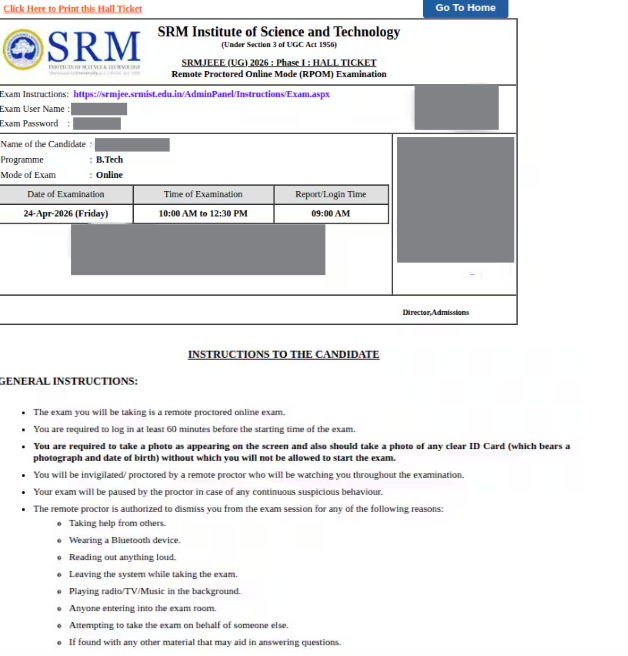
The SRMJEEE 2027 admit card contains numerous details printed on it as submitted during the Registration Process for SRMJEEE 2027. The details mentioned on the SRMJEEE admit card are as follows:
- Name and address of the candidate and registration number
- Candidate's photograph and signature
- Reporting time and selected program
- Date and time of the examination
- Instructions and guidelines for the exam day.
SRMJEEE Admit Card 2027 (Important Documents)
Candidates are required to have the SRMJEEE admit card on their exam day. Along with this, students must keep their original ID card handy. Either of the following documents can be used, along with the admit card:
- Ration Card
- Aadhaar Card
- Passport
- Voter ID
- Driving License
- PAN Card
What to Do if SRMJEEE 2027 Admit Card isn’t Downloadable?
If candidates face any problems while checking or downloading the SRMJEEE 2027 admit card, they should know how to resolve them. Candidates may consider the following steps to resolve the issue:
- Confirm that the application number, date of birth, and security code are entered accurately.
- Clear the browser cache or attempt to use an alternative browser.
- Confirm whether the application fee payment has gone through. Check for temporary server issues or heavy traffic on the site.
- If all the above don't work, contact SRM admission office with the application details.
- Recheck the application details provided during the registration process.
Students should check the SRMJEEE 2027 Syllabus to understand important topics, prepare in the right way, and score better in the exam.
SRMJEEE Admit Card 2027(Exam Day Guidelines)
The SRMJEEE admit card also contains the exam day guidelines for students. It is of utmost importance for candidates to know, understand, and follow the SRMJEEE exam day guidelines properly. Failure to do so may result in immediate disqualification. Check out the following points for SRMJEEE 2027 exam day guidelines.
Candidates must use the login details and password from their admit card to start the exam.
The total exam duration is 120 minutes.
Students should log in at least 60 minutes before the exam to upload their photo, ID proof, and read the instructions.
They cannot exit the exam during the first 120 minutes, even if they finish early.
Only one question appears at a time on the screen.
Canddiates can answer or skip a question, but once they move forward, they cannot go back.
After finishing, follow the on-screen steps to close the exam properly.
The “I want to submit the exam” button appears after 90 minutes.
To exit, aspirants must enter the quit password given in the exam instruction manual (this step is compulsory).
The exam will automatically end when the allotted time is over.
SRMJEEE Admit Card 2027(Common Errors to Check)
There are certain cases where the details printed on the SRMJEEE admit card were incorrect. It is important for candidates to check the details mentioned on the admit card properly in order to avoid further confusion. Candidates must check their name, exam paper, date of birth, gender, exam city, and exam date on the admit card in priority. In case of any error or discrepancy on the SRMJEEE 2027 admit card, candidates must report it to the exam authorities through email or the helpline number given below -
- Helpline Number: 044-27455510, 044-47437500
- Email ID: admissions.india@srmuniv.ac.in
SRMJEEE Admit Card 2027 FAQs
How do I download my SRMJEEE 2027 admit card?
After getting a confirmed slot booking for the examination, students will be able to download the SRMJEEE 2027 admit card from the SRM admission portal. The slot booking is available two days before the commencement of the examination.
When will the slot booking start for SRMJEEE 2027?
The SRMJEEE 2027 slot booking is expected to open approximately two days prior to the examination date. After students have booked their slot, they can download their admit card.
What shall I do if I am unable to download my SRMJEEE 2027 admit card?
In case students fail to download their SRMJEEE admit card 2027, wait for at least 24 hours. Then, if they still face a problem, they must raise their query under the technical query section at the application portal.
Do I have to carry my admit card at the time of SRMJEEE 2027 examination?
The SRMJEEE 2027 admit card is the most important document required to be carried on the exam day to the exam centre. Candidates will be allowed to enter the exam hall only if they have their admit card.
May I change the SRMJEEE exam 2027 time slot if I have booked it already?
Students will not be permitted to make a change to their slot after the booking has taken place and their admit card has been downloaded. While booking, they should make sure to opt for a time slot that is favourable to them.
Exam Calendar
Explore exam calendars tailored to your interest