
• Updated on 16 Oct, 2026 by Simran
What's new?
UPSC ESE Latest news and articles
The UPSC ESE (IES) 2027 Prelims will be held on 31 January 2027. As per the official notification, candidates who appear can submit representations on the questions and on the provisional answer keys of the objective papers for five days, from the 3rd day after the exam date to 6:00 PM on the 7th day, only through upsconline.nic.in.
The notification provides this representation window for questions and provisional answer keys, but it does not specify a public release date for the provisional answer keys. Candidates should follow the instructions shown on the UPSC representation portal. The official answer keys published for general reference have historically been released after the examination process concludes. Unofficial keys published by coaching institutes after the exam are not UPSC documents.
Latest Update: The ESE 2027 answer key has not been released, as the Prelims is on 31 January 2027. Counting from the day after the exam, the representation window works out to 3 to 7 February 2027 (until 6:00 PM on 7 February); UPSC will confirm the exact dates. The official ESE 2026 answer key is still awaited, since the ESE 2026 interviews run until 30 October 2026.
- UPSC ESE Answer Key 2027 Highlights
- UPSC ESE 2027 Answer Key Representation Window
- How to Submit a Representation on the UPSC ESE Answer Key
- How to Check the Official UPSC ESE Answer Key
- How to Calculate Your UPSC ESE Prelims Score
- After the Answer Key: Result and Cutoff
- FAQs on UPSC ESE Answer Key 2027
UPSC ESE Answer Key 2027 Highlights
| Particulars | Details |
| Exam | Engineering Services Examination (ESE) 2027, also called IES 2027 |
| Answer key for | Prelims objective papers: Paper I (General Studies and Engineering Aptitude) and Paper II (engineering discipline) |
| Prelims date | 31 January 2027 |
| Representation window | 5 days, from the 3rd day after the exam date to 6:00 PM on the 7th day |
| Representation mode | Online only, on upsconline.nic.in |
| Provisional answer key release date | Not stated in the notice |
| Final answer key release date | Not stated in the notice; in past cycles, after the final result |
| Negative marking | One-third of the question's marks for each wrong answer |
| Mains answer key | None; the Mains has conventional (descriptive) papers |
UPSC ESE 2027 Answer Key Representation Window
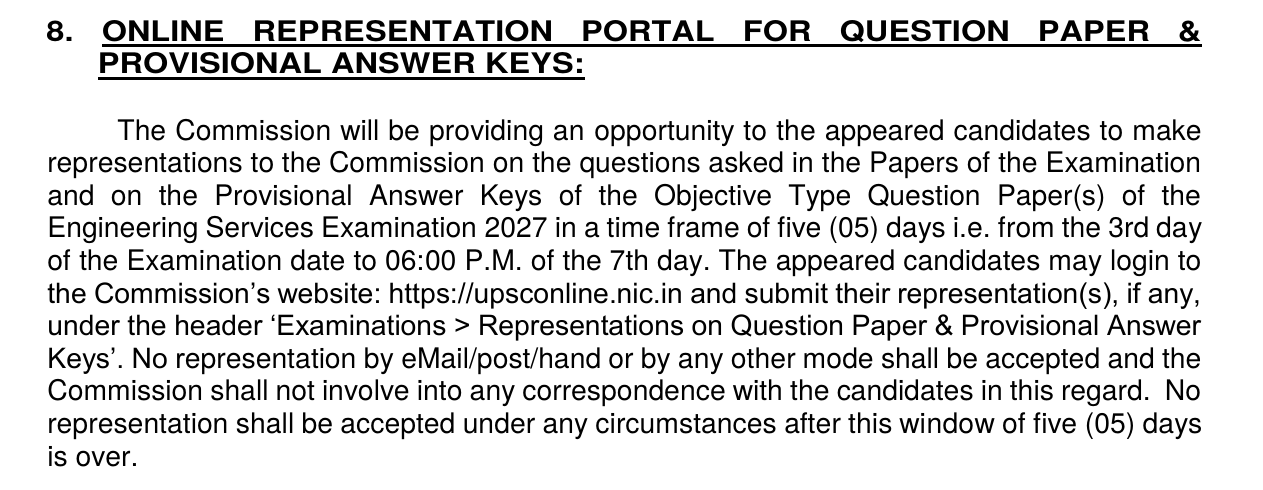
The ESE 2027 notification gives candidates five days to raise representations on the Prelims questions and provisional answer keys:
| Rule | Details (as per the notice) |
| Who can submit | Candidates who appeared in the exam |
| What can be challenged | Questions asked in the papers and the provisional answer keys of the objective papers |
| Window | From the 3rd day after the exam date to 6:00 PM on the 7th day; counting from the day after the exam, this works out to 3 to 7 February 2027 (calculated, not announced by UPSC) |
| Where | upsconline.nic.in, under 'Examinations > Representations on Question Paper & Provisional Answer Keys' |
| Other modes | Not accepted by email, post, hand or any other mode |
| After the window | No representation is accepted under any circumstances |
UPSC will not correspond with candidates about their representations, so each one should be complete and clearly argued when submitted.
How to Submit a Representation on the UPSC ESE Answer Key
- Go to upsconline.nic.in during the five-day window.
- Log in to the UPSC account you used to apply.
- Open 'Examinations', then 'Representations on Question Paper & Provisional Answer Keys'.
- Enter the details of each question you want to challenge, as the portal asks.
- Explain the issue clearly, with reasoning or references, and submit before 6:00 PM on the 7th day.
The portal's on-screen instructions apply. Keep a copy of every representation you submit.
How to Check the Official UPSC ESE Answer Key
No ESE 2027 answer key is available yet. Once UPSC publishes it:
- Visit upsc.gov.in.
- Open the answer key section under Examinations.
- Select Engineering Services (Preliminary) Examination 2027.
- Download the PDF for your paper: Paper I, or Paper II for your engineering discipline.
- Match the question booklet series (A, B, C or D) printed on your booklet before comparing answers.
How to Calculate Your UPSC ESE Prelims Score
The Prelims has negative marking: one-third of the marks assigned to a question is deducted for each wrong answer. Marking more than one option counts as wrong, and a blank answer gets no penalty.
Score = (correct answers × marks per question) − (wrong answers × one-third of the marks per question)
The notice does not fix the number of questions, but past ESE Prelims papers, including ESE 2026, have followed this structure:
| Paper | Questions | Maximum marks | Marks per question | Deduction per wrong answer |
| Paper I: General Studies and Engineering Aptitude | 100 | 200 | 2 | About 0.67 |
| Paper II: Engineering discipline | 150 | 300 | 2 | About 0.67 |
| Total | 250 | 500 |
Example: in Paper I, a candidate with 70 right and 15 wrong answers scores (70 × 2) − (15 × 2/3) = 140 − 10 = 130 marks. Confirm the number of questions and marks printed on the ESE 2027 question papers.
Add the two paper scores to get the Prelims total out of 500. UPSC may also prescribe minimum qualifying marks separately for each Prelims paper, in addition to the aggregate marks required for shortlisting. In ESE 2021 to 2025, UPSC's official cutoff documents set this at 15% of each paper for non-PwBD and 10% for PwBD candidates; these are not confirmed for ESE 2027, so check the official cutoff notice for the year.
After the Answer Key: Result and Cutoff
| Step | ESE 2027 |
| Prelims result | Expected in February 2027 (ESE 2026 result came 18 days after the exam) |
| Prelims cutoff and marks | Published by UPSC after the final result, as in past cycles |
| Mains | 18 June 2027 (no answer key, as the papers are descriptive) |
To compare your estimated score with past years, see the branch-wise figures on the UPSC ESE cutoff page. Result updates are on the UPSC ESE result page.
FAQs on UPSC ESE Answer Key 2027
When will UPSC release the ESE 2027 answer key?
UPSC has not announced a date. The representation window on the provisional keys opens a few days after the 31 January 2027 Prelims, while the official keys for general reference have historically come out after the final result.
Can candidates challenge the UPSC ESE 2027 answer key?
Yes. The notice allows representations on the questions and the provisional answer keys for five days, from the 3rd day after the exam to 6:00 PM on the 7th day, on upsconline.nic.in.
Is the ESE 2026 answer key out?
Not yet. In past cycles, UPSC published the official ESE answer key after the final result, and the ESE 2026 interviews continue until 30 October 2026.
Are coaching institute answer keys official?
No. Keys published by coaching institutes after the exam are unofficial estimates. Only keys published by UPSC on upsc.gov.in are official.
How is the ESE Prelims score worked out from the answer key?
Multiply correct answers by the marks per question, then subtract one-third of the marks per question for every wrong answer. Blank answers carry no penalty.
Is there an answer key for the ESE Mains?
No. The Mains has two conventional, descriptive papers, so there is no objective answer key.
Can a representation be sent by email or post?
No. The notice accepts representations only through the online portal, and none after the five-day window closes.
Where can I check my IES marks and cutoff?
UPSC has published ESE marks and cutoffs after the final result in past cycles. Past cutoffs are on the UPSC ESE cutoff page.
How do I download the UPSC ESE 2027 answer key PDF?
Once UPSC publishes it, open the answer key section on upsc.gov.in, choose Engineering Services (Preliminary) Examination 2027 and download the PDF for your paper and booklet series. It is not available yet.