
• Updated on 6 Oct, 2026 by Sounak Pyne
What's new?
SNAP Latest news and articles
SNAP Admit Card 2026 will be released separately for each SNAP test on the official SNAP website. The Test 1 admit card will be available on December 7, Test 2 on December 11 and Test 3 on December 18, 2026. Candidates can download the admit card using their registered login details. The admit card will mention the candidate’s test date, test timing, SNAP Exam Centre and other important instructions.
Candidates appearing for more than one SNAP test must check the admit card issued for each test. The test timing will be communicated through the respective admit card. Candidates should download the document as soon as it becomes available and verify all details before the examination day.
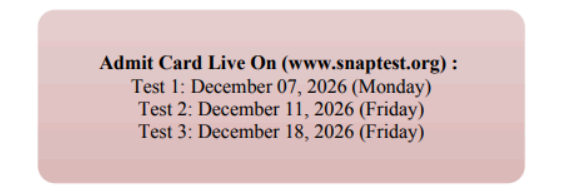
SNAP Admit Card 2026 Important Dates
SNAP Admit Card 2026 will be released separately for the three tests. Candidates can appear for up to three SNAP tests, and the higher score is considered when candidates take more than one test. The SNAP Dates 2026 schedule should be checked along with the admit card because the official document contains the candidate-specific test timing and centre information.
| SNAP 2026 Event | Date |
| Registration and Payment Closes | November 25, 2026 |
| SNAP Test 1 Admit Card | December 7, 2026 |
| SNAP Test 1 | December 13, 2026 |
| SNAP Test 2 Admit Card | December 11, 2026 |
| SNAP Test 2 | December 19, 2026 |
| SNAP Test 3 Admit Card | December 18, 2026 |
| SNAP Test 3 | December 26, 2026 |
| SNAP 2026 Result | January 12, 2027 |
Note: Candidates appearing for multiple tests should download and verify the admit card for each registered test separately.
How to Download SNAP Admit Card 2026?
Candidates can download the SNAP Admit Card 2026 from snaptest.org after the respective admit card link becomes active. The process requires the login credentials used during registration. Candidates should use a stable internet connection and save the downloaded PDF immediately. After downloading, check the candidate name, SNAP ID, photograph, test date, timing and centre details before taking a clear printout.
- Visit the official SNAP website at snaptest.org.
- Open the SNAP 2026 admit card link.
- Enter the registered login credentials.
- Submit the details to access the admit card.
- Select the admit card for the required SNAP test.
- Download the admit card PDF.
- Verify all details printed on the document.
- Save the PDF and take a clear printout.
Candidates who have registered for more than one test should not assume that one admit card covers every attempt. Each test has a separate admit card and the candidate should carry the document applicable to that test.
Candidates can also review the SNAP Registration 2026 to understand the details linked to their registration.
Details Mentioned on SNAP Admit Card 2026
The SNAP Admit Card contains the information required for examination-day identification and entry. Candidates should check the document immediately after downloading it. The name and SNAP ID should match the registration details. The photograph should remain clear and recognisable. The test date, timing, centre name and complete address should also be checked carefully because these details determine where and when the candidate must report.
| Admit Card Detail | What to Check |
| Candidate Name | Check spelling against registration details |
| SNAP ID | Verify the identification number |
| Photograph | Ensure the image is clear |
| Test Date | Confirm the correct test |
| Test Timing | Check the reporting and test timing |
| SNAP Exam Centre | Verify the allotted centre |
| Centre Address | Check the complete venue address |
| Instructions | Read all examination instructions |
Important: Candidates should not make changes to the downloaded admit card themselves. Any important discrepancy should be reported through the official SNAP communication channel.
|
How to Check Errors in SNAP Admit Card 2026?Candidates should verify their admit card immediately after downloading it. The candidate name, SNAP ID, photograph, test date, test timing and centre details should match the registration information. The photograph should also be clear enough for identification. Candidates travelling to another city should check the complete centre address on a map before examination day. The reporting time should receive special attention because late arrival can create problems during entry and verification. Keeping both the PDF and a printed copy provides a useful backup. |
What to Do If SNAP Admit Card Is Not Downloading?
A candidate may face a temporary download problem because of incorrect login details, browser issues, internet problems or heavy website traffic. Candidates should first verify their login information and try again using an updated browser. If the website remains slow, they should wait and access it again rather than repeatedly refreshing the page. The admit card should always be downloaded from the official SNAP website.
| Problem | Action to Take |
| Login details not accepted | Recheck the registered credentials |
| Website not loading | Refresh and try again later |
| PDF not opening | Use an updated PDF reader |
| Download interrupted | Check the internet connection and retry |
| Photograph unclear | Contact SNAP authorities |
| Personal details incorrect | Report the discrepancy officially |
Note: Candidates should resolve download or correction issues well before the examination day. Waiting until the last moment can create unnecessary problems.
Documents to Carry to SNAP Exam Centre 2026
Candidates should carry the printed SNAP Admit Card and the identification document permitted under the official examination instructions. The printed document should remain clear enough for verification. Candidates should check the latest instructions on the admit card before leaving for the examination. The exact SNAP Exam Centre address should also be confirmed because the city selected during registration does not itself represent the final venue. The SNAP Exam Centres 2026 page can help candidates understand the test-city network, while the admit card remains the final source for the allotted venue.
SNAP Exam Day Guidelines 2026
Candidates should reach the allotted SNAP Exam Centre before the reporting time mentioned on the admit card. The centre address should be checked before starting the journey, especially when the candidate is travelling to another city. Candidates should keep the printed admit card and required identification document ready for verification. They should follow all security and entry instructions provided at the venue and avoid carrying items that are not permitted. The test is conducted in CBT mode, so candidates should carefully follow the instructions displayed before starting the examination.
| Before Leaving | At the SNAP Exam Centre |
| Check admit card | Follow entry instructions |
| Carry required ID | Complete verification |
| Check centre address | Follow security procedures |
| Confirm reporting time | Follow test instructions |
| Plan the travel route | Follow staff directions |
Important: The instructions printed on the candidate's admit card should take priority over general examination advice.
SNAP Admit Card 2026 FAQs
When will SNAP Admit Card 2026 be released?
The Test 1 admit card will be released on December 7, Test 2 on December 11 and Test 3 on December 18, 2026.
Where can I download SNAP Admit Card 2026?
Candidates can download the admit card from snaptest.org using their registered login credentials.
Will one admit card be issued for all three SNAP tests?
No. Candidates appearing for multiple tests should download the admit card applicable to each registered test.
What details are mentioned on the SNAP Admit Card?
The admit card contains the candidate name, SNAP ID, photograph, test date, test timing, centre details and examination instructions.
What should I do if there is an error in my SNAP Admit Card?
Candidates should contact the official SNAP authorities if they find an important error. They should not alter the downloaded document themselves.
Exam Calendar
Explore exam calendars tailored to your interest